AI · AIDP · OAC
How to Connect Oracle Analytics Cloud to the Oracle AI Data Platform Catalog
IntroductionOracle Analytics Cloud is often discussed in the context of semantic models, dashboards and AI assistants, while Oracle AI Data Platform is increasingly discussed in the context of data platform, governance…
Introduction
Oracle Analytics Cloud is often discussed in the context of semantic models, dashboards and AI assistants, while Oracle AI Data Platform is increasingly discussed in the context of data platform, governance and catalog capabilities.
Connecting Oracle Analytics Cloud to the Oracle AI Data Platform catalog helps bring these worlds together. It allows analytics users to discover and work with catalogued data assets more directly, while aligning Oracle Analytics more closely with the broader governed enterprise data ecosystem.
In this post, I will walk through the process of connecting Oracle Analytics Cloud to the Oracle AI Data Platform catalog, show what the connection looks like in practice, and highlight a few observations along the way.
What This Connection Enables
At a practical level, connecting OAC to the AIDP catalog can help with several things:
- discovery of catalogued data assets from within Oracle Analytics Cloud
- closer alignment between analytics and the governed data platform
- improved visibility of trusted data assets for analytics users
- a more integrated workflow between catalog, governance and analytics
This is not just a connection exercise. It is also part of bringing Oracle Analytics more directly into the wider enterprise data and AI landscape.
Prerequisites
Before starting the connection, make sure the following are in place:
- access to Oracle Analytics Cloud
- access to an Oracle AI Data Platform environment
- appropriate permissions to the AIDP catalog
- any required identity, network or tenancy prerequisites
- the endpoint or connection details required by OAC
Depending on your environment, you may also need to confirm whether there are region-specific, network or policy constraints that could affect connectivity.
Step 1: Start the Connection in OAC
Begin in Oracle Analytics Cloud and open the Create menu in the top-right corner. From there, select Connection.
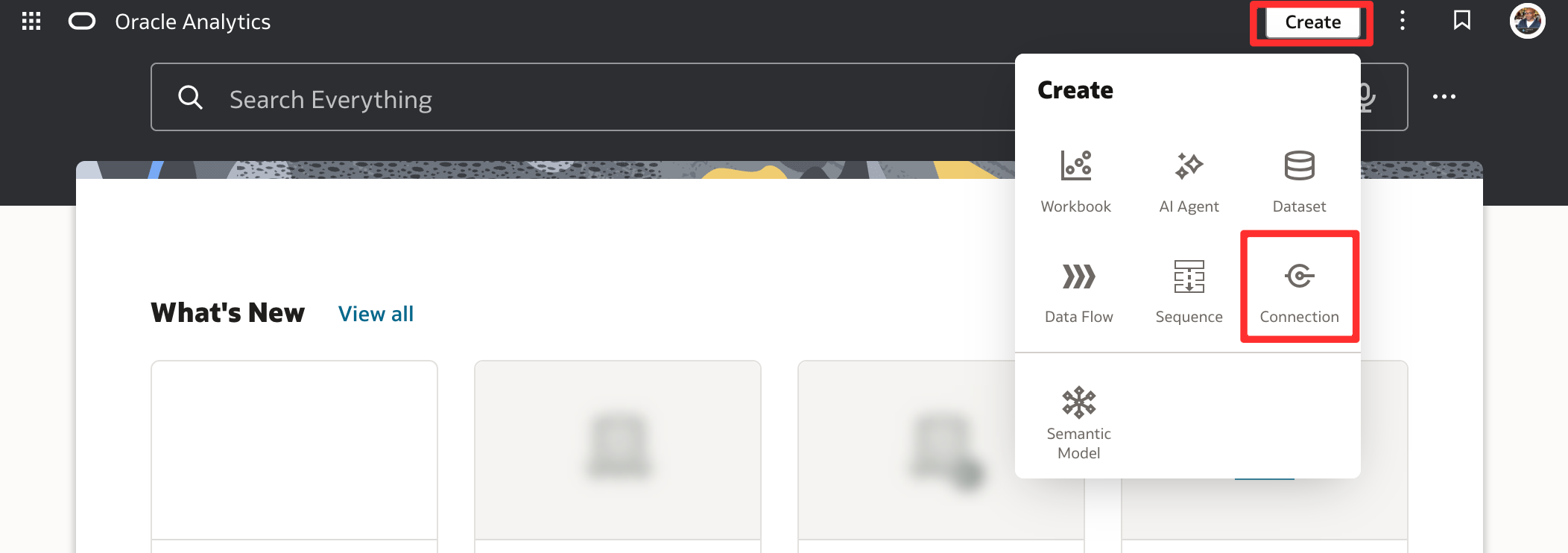
Create a connection from OAC home page
This is the entry point for creating new source and platform connections in OAC.
Step 2: Retrieve the Connection Details from AIDP
Before completing the connection in OAC, go to Oracle AI Data Platform Workbench and navigate to the relevant workspace and compute instance. Open the Connection details tab and, under Connect with BI Tool, select Oracle Analytics Cloud.
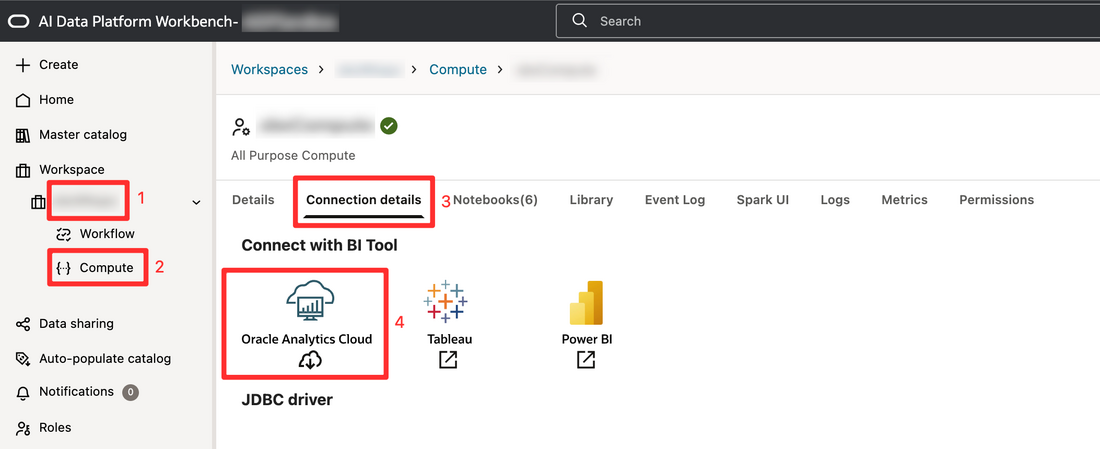
AIDP Workbench showing workspace, compute, Connection details tab and Oracle Analytics Cloud option
This is where AIDP exposes the connection details needed by OAC. In practice, this step is easy to overlook, but it is central to the whole setup.
Step 3: Select the Oracle AI Data Platform Connection Type in OAC
Return to Oracle Analytics Cloud and create a new connection. In the connection type dialog, search for Oracle AI Data Platform and select it.
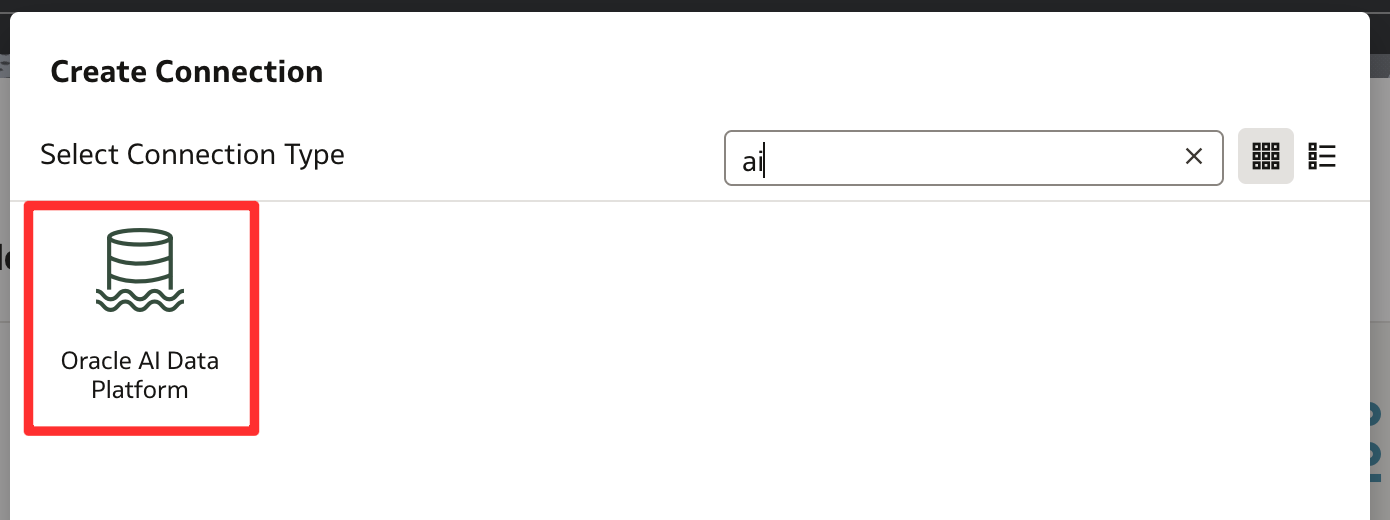
Select the Oracle AI Data Platform connector type
Once selected, OAC opens the connection form for the AIDP catalog connector.
Step 4: Complete the Connection Form and Save
Populate the connection form using the details obtained from AIDP.
This includes:
- a connection name and description
- the downloaded connection details file from AIDP
- authentication type
- DSN
- user OCID
- tenancy OCID
- region
- private API key
- API key fingerprint
- catalog
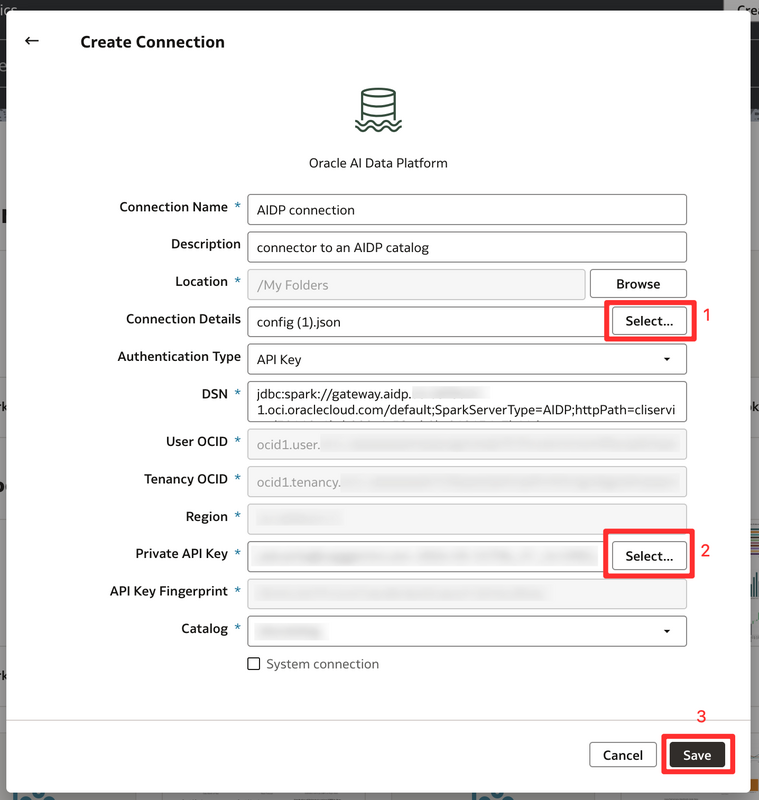
Enter Oracle AI Data Platform connection credentials here
Two details are especially worth noting here. First, you need to select the connection details file exported from AIDP. Second, you also need to provide the private API key separately. Once everything has been entered correctly, save the connection.
This is one of the most important stages because even small mistakes in endpoints, permissions, fingerprints or authentication settings can prevent the connection from succeeding.
Step 5: Create a Dataset from the New Connection
After the connection has been created successfully, locate it in OAC, open the action menu, and select Create Dataset.
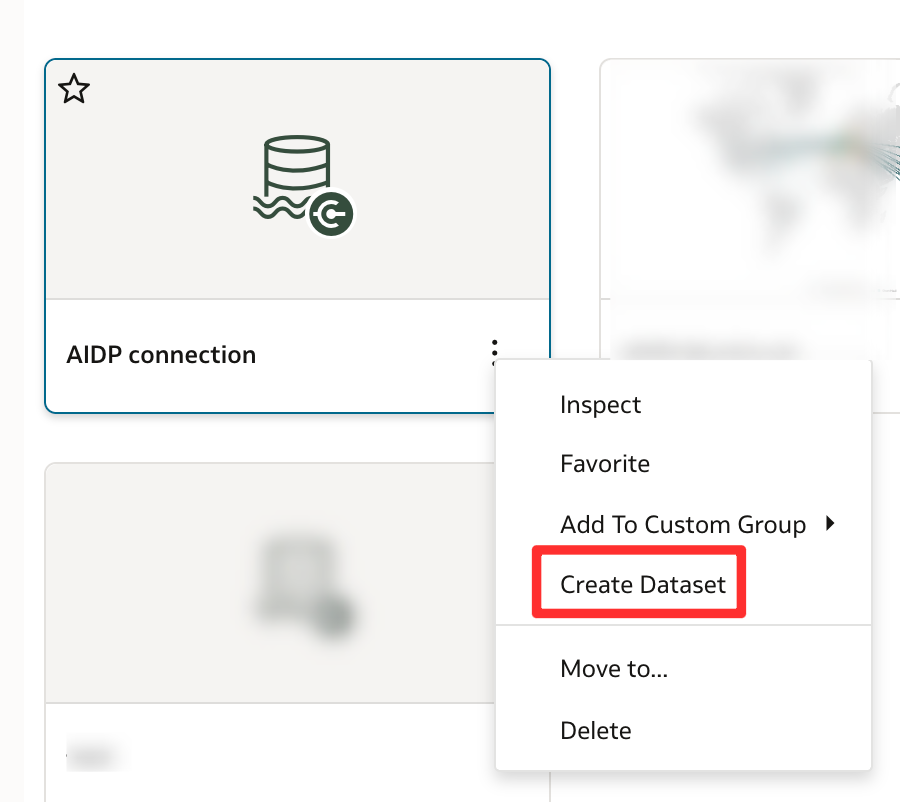
In Oracle Analytics Cloud, create a dataset
This is the point where the connection moves from simple setup into practical use.
Step 6: Select the AIDP Connection and Use the Exposed Assets
In the Create Dataset dialog, select the newly created AIDP connection
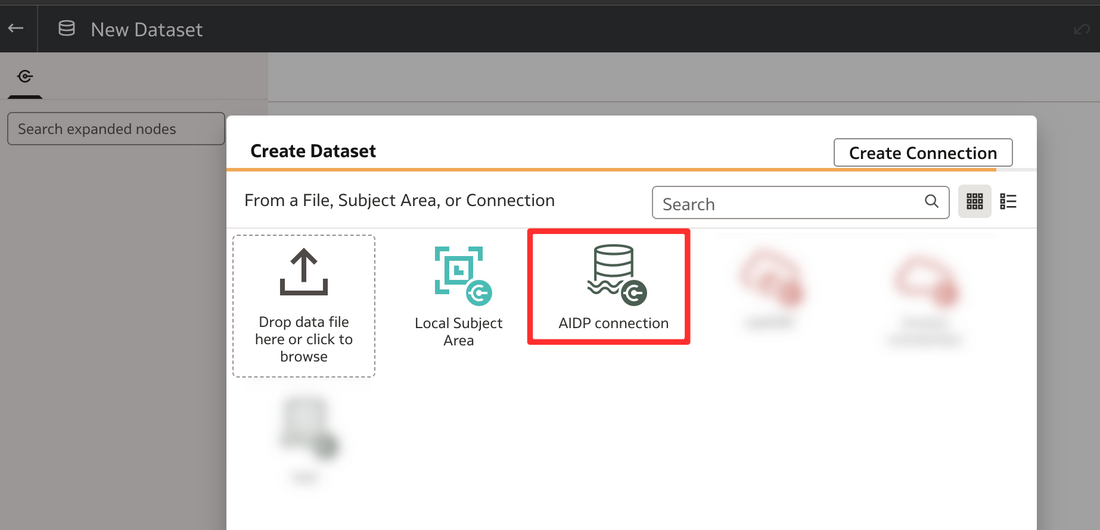
From there, OAC can begin to expose the catalogued assets available through the connection. This is where the setup becomes meaningful from an analytics perspective, because the governed assets surfaced through AIDP are now available for use in Oracle Analytics workflows.
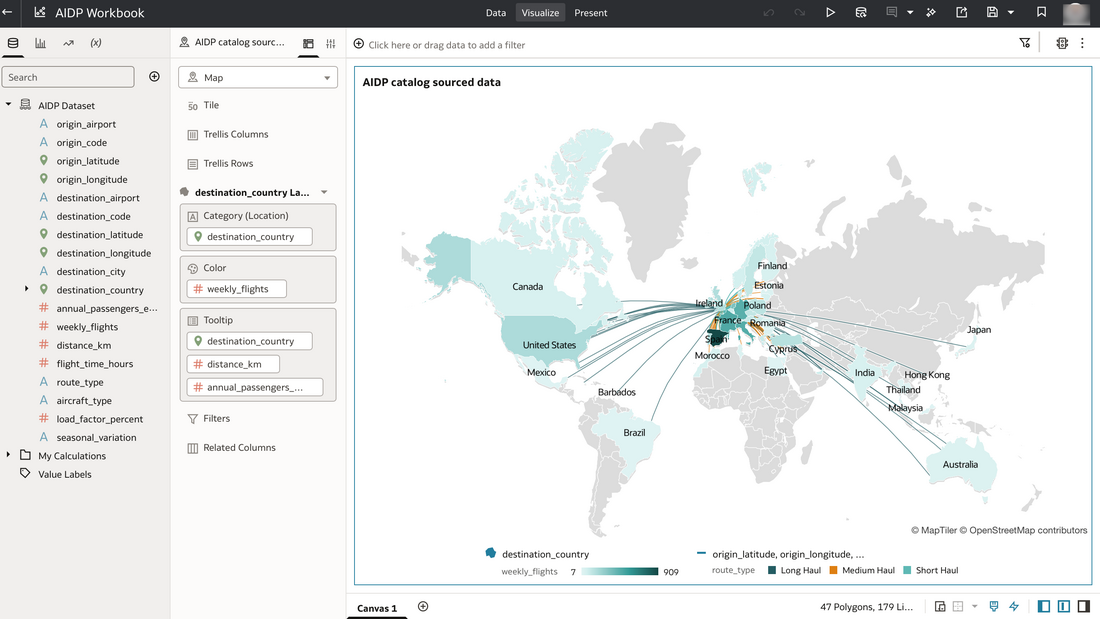
An OAC workbook created from an AIDP catalog sourced dataset
What Caught Me Out
A few things to look out for:
- permissions may be correct in one platform but still not sufficient end to end
- endpoint details may need to be copied carefully and exactly
- you may need to edit the JSON configuration file from AIDP to add the API key fingerprint. If you do not have access to the OCI Console, you can request the fingerprint from an OCI administrator, who can retrieve it from the IAM user management section. Oracle also documents the relevant OCI credential steps here: Locating OCI credentials
- the region in the downloaded JSON file may default to the tenancy’s default OCI region rather than the actual region of the AIDP instance. If your AIDP environment is provisioned in a different region, you will need to manually update the region entry in the JSON file
- region, tenancy or network configuration may affect what works
- AIDP compute associated to the catalog must be running for the catalog to be accessible in OAC
Why This Matters Architecturally
Although this is a technical connection exercise, it matters for a broader reason. Connecting Oracle Analytics Cloud to the Oracle AI Data Platform catalog is part of bringing analytics closer to the wider governed enterprise data ecosystem. It strengthens the relationship between:
- analytics consumption
- governed discovery
- metadata visibility
- enterprise data platform capabilities
That matters because enterprise analytics increasingly needs to sit within a broader data and AI architecture, not outside it.
Conclusion
Connecting Oracle Analytics Cloud to the Oracle AI Data Platform catalog is a practical step towards a more integrated analytics and data platform experience.
It allows OAC to participate more directly in the governed discovery and visibility of enterprise data assets, while bringing analytics users closer to the broader AIDP ecosystem.